
1 / 10
Synology Disk Station DS1817 NAS 8 BAY Business Class 8GB High Speed RAM Installed
AED 3,200

Item Details
Age
2-5 years
Condition
Almost no noticeable problems or flaws
Brand
Other
Model name
SYNOLOGY NAS 1817
Usage
Used only a few times
Model Year
2017
Warranty
Does not apply
Storage Type
HDD (Hard Disk Drives)
Connectivity Technology
Ethernet, USB, LAN, WAN
Posted on: 12th November 2026
Description
The Synology DiskStation DS1817 is a high capacity, full-featured NAS solution that promises to bring high-end functionality and performance to the SMB market, all at an affordable price point. Whereas the DS1817+ is optimized for encryption and intensive tasks, the DS1817 is specced to potentially deliver higher data-transfer rates. It comes equipped with built-in, dual 10GbE LAN and dual Gigabit ports, and support for link aggregation and failover functions. Moreover, with its 8-bay configuration, the DS1817 is a very scalable device as it supports a maximum of 18 drives using two DX517 Synology expansion units for a whopping total of 216TB via 12TB drives.
The DS1817 is powered by a Quad-core 1.7GHz CPU (Annapurna Labs Alpine AL-314) and features up to 8GB of DDR3L RAM (4GB standard). With this hardware, the 8-bay Synology NAS is quoted to deliver a maximum of 1,577MB/s in sequential reads, which is roughly 400MB/s faster than the plus model.
Like all Synology NAS solutions, the DS1817 is managed by the comprehensive DSM operating system. Users will be able to take advantage of software like the Cloud Station Suite, which offers real-time data synchronization across all devices (including other Synology NAS solutions) when editing or adding files. Synology uses "intelliversioning" to ensure that the most important file versions are used, which helps to optimize storage space. Users will also be able to leverage the web-based, fast and secure management tool File Station, which features easy, drag-and-drop operation and without any complicated setup process. In addition, its advanced search and filtering capabilities mean more efficient organization and sharing of files.
Available as a diskless model for roughly $840, the DS1817 is covered by an 3-year limited warranty.
Synology DiskStation DS1817 Specifications
CPU
CPU Model: Annapurna Labs Alpine AL-314
CPU Architecture: 32-bit
CPU Frequency: Quad Core 1.7 GHz
Hardware Encryption Engine
Memory:
System Memory: 4 GB DDR3L
Memory Module: Pre-installed 4GB (1 x 4GB)
Total Memory Slots: 2
Memory Expandable up to: 8 GB (4GB x 2)
Storage
Drive Bays: 8
Maximum Drive Bays with Expansion Unit: 18
Compatible Drive Type:
3.5" SATA HDD
2.5" SATA HDD
2.5" SATA SSD
Maximum Internal Raw Capacity: 96 TB (12 TB drive x 8) (Capacity may vary by RAID types)
Maximum Raw Capacity with Expansion Units: 216 TB (12 TB drive x 18) (Capacity may vary by RAID types)
Maximum Single Volume Size: 108 TB
Hot Swappable Drive
External Ports
RJ-45 1GbE LAN Port: 2 (with Link Aggregation / Failover support)
RJ-45 10GbE LAN Port: 2 (with Link Aggregation / Failover support)
USB 3.0 Ports: 2
eSATA Ports: 2
File System:
Internal Drives: EXT4
External Drives:
EXT4
EXT3
FAT
NTFS
HFS+
exFAT
Appearance:
Size (Height x Width x Depth): 157 mm x 340 mm x 233 mm
Weight: 5.31 kg
Others:
System Fan: 120 mm x 120 mm x 2 pcs
Fan Speed Mode
Cool Mode
Quiet Mode
Easy Replacement System Fan
Power Recovery
Noise Level: 24.2 dB(A)
Power
Scheduled Power On/Off
Wake on LAN/WAN
Power Supply Unit / Adapter: 250W
AC Input Power Voltage : 100V to 240V AC
Power Frequency: 50/60 Hz, Single Phase
Power Consumption:
59.1 W (Access)
26.4 W (HDD Hibernation)
Environment Temperature
Operating Temperature: 5°C to 40°C (40°F to 104°F)
Storage Temperature: -20°C to 60°C (-5°F to 140°F)
Relative Humidity: 5% to 95% RH
Warranty: 3-year Limited
Design and Build
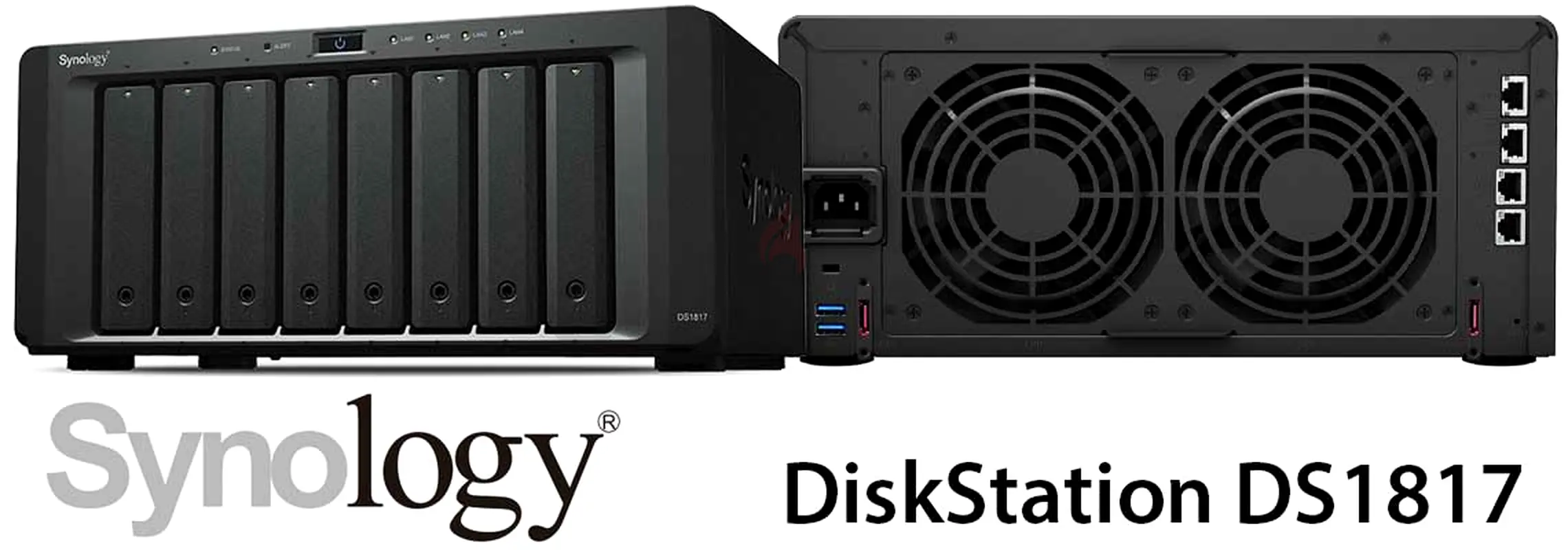
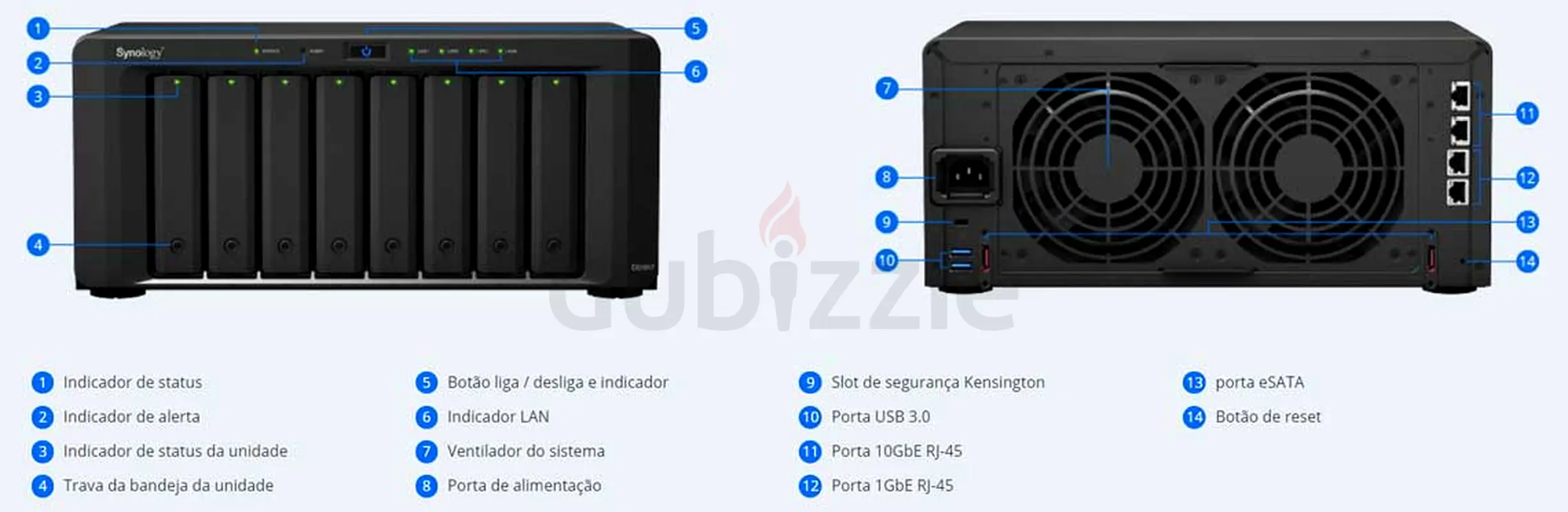
At first glance, the DS1817 looks identical to the plus version with the usual matt-black plastic enclosure; however, there are small differences. Unlike the plus model, the DS1817 does not have a USB port on the front panel and it has a noticeably smaller bezel underneath the 8 drive bays. Along the top are the LED lights, which surround the power button. This includes the Status and Alert indicators, which gives information about the status of the NAS and warnings related to fan or temperature, respectively, and the LAN indicators, which display the status of the network connection. Each drive-bay has an individual drive lock and status indicator. You can access drives by pressing the lower part of the tray and pulling out the handle.
Turning the NAS around will reveal the dual fans (4.72” x 4.72”); if one of then malfunctions, a loud beeping noise will sound. Located at the bottom left are the power port, two USB 3.0 ports, and the Kensington Security Slot, while an eSATA port are located on either side of the DS1817.On the right are two 10GbE RJ-45 ports, two 1GbE RJ-45 ports and a reset button.
Testing Background and Comparables
The Synology DS1817 will be compared two other 8-bay NAS units, including the Synology DS1817+ and the NETGEAR 628X. We tested the DS1817 in RAID6 and used both SSDs and HDDs in both iSCSI and CIFS configurations.
The drives used for this review were:
Toshiba HK3R2 960GB SSDs
Toshiba N300 NAS 8TB HDDs
Application Performance Analysis
SQL Server Performance
Each SQL Server VM is configured with two vDisks: 100GB volume for boot and a 500GB volume for the database and log files. From a system resource perspective, we configured each VM with 16 vCPUs, 64GB of DRAM and leveraged the LSI Logic SAS SCSI controller. While our Sysbench workloads tested previously saturated the platform in both storage I/O and capacity, the SQL test is looking for latency performance.
This test uses SQL Server 2014 running on Windows Server 2012 R2 guest VMs, being stressed by Dell's Benchmark Factory for Databases. While our traditional usage of this benchmark has been to test large 3,000-scale databases on local or shared storage, in this iteration we focus on running out four 1,500-scale databases on the NAS over iSCSI.
SQL Server Testing Configuration (per VM)
Windows Server 2012 R2
Storage Footprint: 600GB allocated, 500GB used
SQL Server 2014
Database Size: 1,500 scale
Virtual Client Load: 15,000
RAM Buffer: 48GB
Test Length: 3 hours
2.5 hours preconditioning
30 minutes sample period
SQL Server OLTP Benchmark Factory LoadGen Equipment
Dell PowerEdge R730 Virtualized SQL 4-node Cluster
Eight Intel E5-2690 v3 CPUs for 249GHz in cluster (Two per node, 2.6GHz, 12-cores, 30MB Cache)
1TB RAM (256GB per node, 16GB x 16 DDR4, 128GB per CPU)
SD Card Boot (Lexar 16GB)
4 x Mellanox ConnectX-3 InfiniBand Adapter (vSwitch for vMotion and VM network)
4 x Emulex 16GB dual-port FC HBA
4 x Emulex 10GbE dual-port NIC
VMware ESXi vSphere 6.0 / Enterprise Plus 8-CPU
When looking at SQL Server Output, we tested two SQL VMs each with a 15,000VU load applied. This gave us individual TPS scores ranging from 720.455 to 701.445 in RAID6, while aggregate results came in at 1421.9 TPS. These results were significantly less than the plus model as well as the Netgear 628x.
Synology High Availability (SHA)
Synology High Availability (SHA) is a complete hardware and data redundancy solution, ideal for responding to unforeseen disasters. By combining two Synology NAS storage devices to form a high-availability cluster, the NAS acting as the active server will control all data operations and services, while cloning the entire system to the passive backup server.
Automatic failover
Real-time protection, minimal data loss.
Hassle-free installation and maintenance
Maximize service availability for virtualization through iSCSI.
File synchronization
Synology Drive provides an integrated universal portal to access the data stored on the DS1817 anytime, anywhere, and synchronize all your files across platforms, including Windows, macOS, Linux, Android, and iOS.
Synchronize files on demand: save storage space and network bandwidth on your PC.
Go back in time: easily recover previous versions of your shared files.
Back up your data: Protect your files with scheduled or real-time backups.
Synology Office, real-time collaboration
Synology Office is a collaboration suite that combines the usability of the public cloud with the privacy and security of the private cloud, enabling multiple users to collaborate on documents and spreadsheets within a protected environment.
Real-time collaboration on the same online documents to increase team productivity.
Instant communication in Synology Chat while editing documents or spreadsheets.
Version control allows the user to easily browse through all changes and recover previous versions.
The DS1817 is powered by a Quad-core 1.7GHz CPU (Annapurna Labs Alpine AL-314) and features up to 8GB of DDR3L RAM (4GB standard). With this hardware, the 8-bay Synology NAS is quoted to deliver a maximum of 1,577MB/s in sequential reads, which is roughly 400MB/s faster than the plus model.
Like all Synology NAS solutions, the DS1817 is managed by the comprehensive DSM operating system. Users will be able to take advantage of software like the Cloud Station Suite, which offers real-time data synchronization across all devices (including other Synology NAS solutions) when editing or adding files. Synology uses "intelliversioning" to ensure that the most important file versions are used, which helps to optimize storage space. Users will also be able to leverage the web-based, fast and secure management tool File Station, which features easy, drag-and-drop operation and without any complicated setup process. In addition, its advanced search and filtering capabilities mean more efficient organization and sharing of files.
Available as a diskless model for roughly $840, the DS1817 is covered by an 3-year limited warranty.
Synology DiskStation DS1817 Specifications
CPU
CPU Model: Annapurna Labs Alpine AL-314
CPU Architecture: 32-bit
CPU Frequency: Quad Core 1.7 GHz
Hardware Encryption Engine
Memory:
System Memory: 4 GB DDR3L
Memory Module: Pre-installed 4GB (1 x 4GB)
Total Memory Slots: 2
Memory Expandable up to: 8 GB (4GB x 2)
Storage
Drive Bays: 8
Maximum Drive Bays with Expansion Unit: 18
Compatible Drive Type:
3.5" SATA HDD
2.5" SATA HDD
2.5" SATA SSD
Maximum Internal Raw Capacity: 96 TB (12 TB drive x 8) (Capacity may vary by RAID types)
Maximum Raw Capacity with Expansion Units: 216 TB (12 TB drive x 18) (Capacity may vary by RAID types)
Maximum Single Volume Size: 108 TB
Hot Swappable Drive
External Ports
RJ-45 1GbE LAN Port: 2 (with Link Aggregation / Failover support)
RJ-45 10GbE LAN Port: 2 (with Link Aggregation / Failover support)
USB 3.0 Ports: 2
eSATA Ports: 2
File System:
Internal Drives: EXT4
External Drives:
EXT4
EXT3
FAT
NTFS
HFS+
exFAT
Appearance:
Size (Height x Width x Depth): 157 mm x 340 mm x 233 mm
Weight: 5.31 kg
Others:
System Fan: 120 mm x 120 mm x 2 pcs
Fan Speed Mode
Cool Mode
Quiet Mode
Easy Replacement System Fan
Power Recovery
Noise Level: 24.2 dB(A)
Power
Scheduled Power On/Off
Wake on LAN/WAN
Power Supply Unit / Adapter: 250W
AC Input Power Voltage : 100V to 240V AC
Power Frequency: 50/60 Hz, Single Phase
Power Consumption:
59.1 W (Access)
26.4 W (HDD Hibernation)
Environment Temperature
Operating Temperature: 5°C to 40°C (40°F to 104°F)
Storage Temperature: -20°C to 60°C (-5°F to 140°F)
Relative Humidity: 5% to 95% RH
Warranty: 3-year Limited
Design and Build
At first glance, the DS1817 looks identical to the plus version with the usual matt-black plastic enclosure; however, there are small differences. Unlike the plus model, the DS1817 does not have a USB port on the front panel and it has a noticeably smaller bezel underneath the 8 drive bays. Along the top are the LED lights, which surround the power button. This includes the Status and Alert indicators, which gives information about the status of the NAS and warnings related to fan or temperature, respectively, and the LAN indicators, which display the status of the network connection. Each drive-bay has an individual drive lock and status indicator. You can access drives by pressing the lower part of the tray and pulling out the handle.
Turning the NAS around will reveal the dual fans (4.72” x 4.72”); if one of then malfunctions, a loud beeping noise will sound. Located at the bottom left are the power port, two USB 3.0 ports, and the Kensington Security Slot, while an eSATA port are located on either side of the DS1817.On the right are two 10GbE RJ-45 ports, two 1GbE RJ-45 ports and a reset button.
Testing Background and Comparables
The Synology DS1817 will be compared two other 8-bay NAS units, including the Synology DS1817+ and the NETGEAR 628X. We tested the DS1817 in RAID6 and used both SSDs and HDDs in both iSCSI and CIFS configurations.
The drives used for this review were:
Toshiba HK3R2 960GB SSDs
Toshiba N300 NAS 8TB HDDs
Application Performance Analysis
SQL Server Performance
Each SQL Server VM is configured with two vDisks: 100GB volume for boot and a 500GB volume for the database and log files. From a system resource perspective, we configured each VM with 16 vCPUs, 64GB of DRAM and leveraged the LSI Logic SAS SCSI controller. While our Sysbench workloads tested previously saturated the platform in both storage I/O and capacity, the SQL test is looking for latency performance.
This test uses SQL Server 2014 running on Windows Server 2012 R2 guest VMs, being stressed by Dell's Benchmark Factory for Databases. While our traditional usage of this benchmark has been to test large 3,000-scale databases on local or shared storage, in this iteration we focus on running out four 1,500-scale databases on the NAS over iSCSI.
SQL Server Testing Configuration (per VM)
Windows Server 2012 R2
Storage Footprint: 600GB allocated, 500GB used
SQL Server 2014
Database Size: 1,500 scale
Virtual Client Load: 15,000
RAM Buffer: 48GB
Test Length: 3 hours
2.5 hours preconditioning
30 minutes sample period
SQL Server OLTP Benchmark Factory LoadGen Equipment
Dell PowerEdge R730 Virtualized SQL 4-node Cluster
Eight Intel E5-2690 v3 CPUs for 249GHz in cluster (Two per node, 2.6GHz, 12-cores, 30MB Cache)
1TB RAM (256GB per node, 16GB x 16 DDR4, 128GB per CPU)
SD Card Boot (Lexar 16GB)
4 x Mellanox ConnectX-3 InfiniBand Adapter (vSwitch for vMotion and VM network)
4 x Emulex 16GB dual-port FC HBA
4 x Emulex 10GbE dual-port NIC
VMware ESXi vSphere 6.0 / Enterprise Plus 8-CPU
When looking at SQL Server Output, we tested two SQL VMs each with a 15,000VU load applied. This gave us individual TPS scores ranging from 720.455 to 701.445 in RAID6, while aggregate results came in at 1421.9 TPS. These results were significantly less than the plus model as well as the Netgear 628x.
Synology High Availability (SHA)
Synology High Availability (SHA) is a complete hardware and data redundancy solution, ideal for responding to unforeseen disasters. By combining two Synology NAS storage devices to form a high-availability cluster, the NAS acting as the active server will control all data operations and services, while cloning the entire system to the passive backup server.
Automatic failover
Real-time protection, minimal data loss.
Hassle-free installation and maintenance
Maximize service availability for virtualization through iSCSI.
File synchronization
Synology Drive provides an integrated universal portal to access the data stored on the DS1817 anytime, anywhere, and synchronize all your files across platforms, including Windows, macOS, Linux, Android, and iOS.
Synchronize files on demand: save storage space and network bandwidth on your PC.
Go back in time: easily recover previous versions of your shared files.
Back up your data: Protect your files with scheduled or real-time backups.
Synology Office, real-time collaboration
Synology Office is a collaboration suite that combines the usability of the public cloud with the privacy and security of the private cloud, enabling multiple users to collaborate on documents and spreadsheets within a protected environment.
Real-time collaboration on the same online documents to increase team productivity.
Instant communication in Synology Chat while editing documents or spreadsheets.
Version control allows the user to easily browse through all changes and recover previous versions.
Location
District 11, Mohammed Bin Rashid City (MBR City), Dubai, UAE

- Accounting / Finance
- Automobile
- Beauty / Salon
- Cleaner / Housekeeper
- Construction
- Cook / Chef
- Customer Service / Call Centre
- Data Management & Analysis
- Design
- Driver / Delivery
- Education
- Engineering
- Event Management & Operations
- Handyman / Technician
- HR / Admin
- Information Technology
- Legal Services
- Logistics & Distribution
- Manufacturing / Warehouse
- Marine Captain / Crew
- Marketing / Advertising
- Media, Art & Entertainment
- Medical / Healthcare
- Real Estate
- Restaurant Operations
- Sales / Business Development
- Secretarial / Front Office
- Security / Guard
- Sports & Fitness
- Travel & Hospitality
- Others
- Jobs Wanted
- Electronics
- Computers & Networking
- Business & Industrial
- Home Appliances
- Sports Equipment
- Clothing & Accessories
- Cameras & Imaging
- Jewelry & Watches
- Pets
- Musical Instruments
- Gaming
- Baby Items
- Toys
- Tickets & Vouchers
- Collectibles
- Books
- Music
- Free Stuff
- Lost/Found
- DVDs & Movies
- Furniture, Home & Garden
- Mobile Phones & Tablets
العربية