
1 / 9
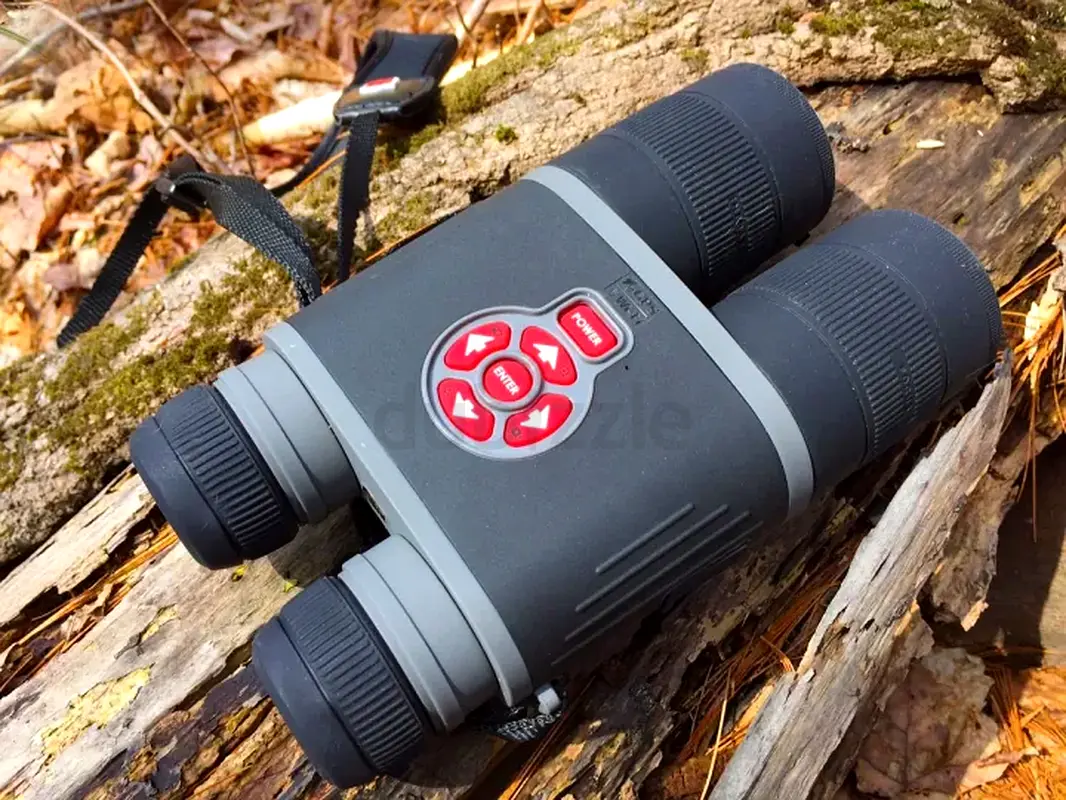
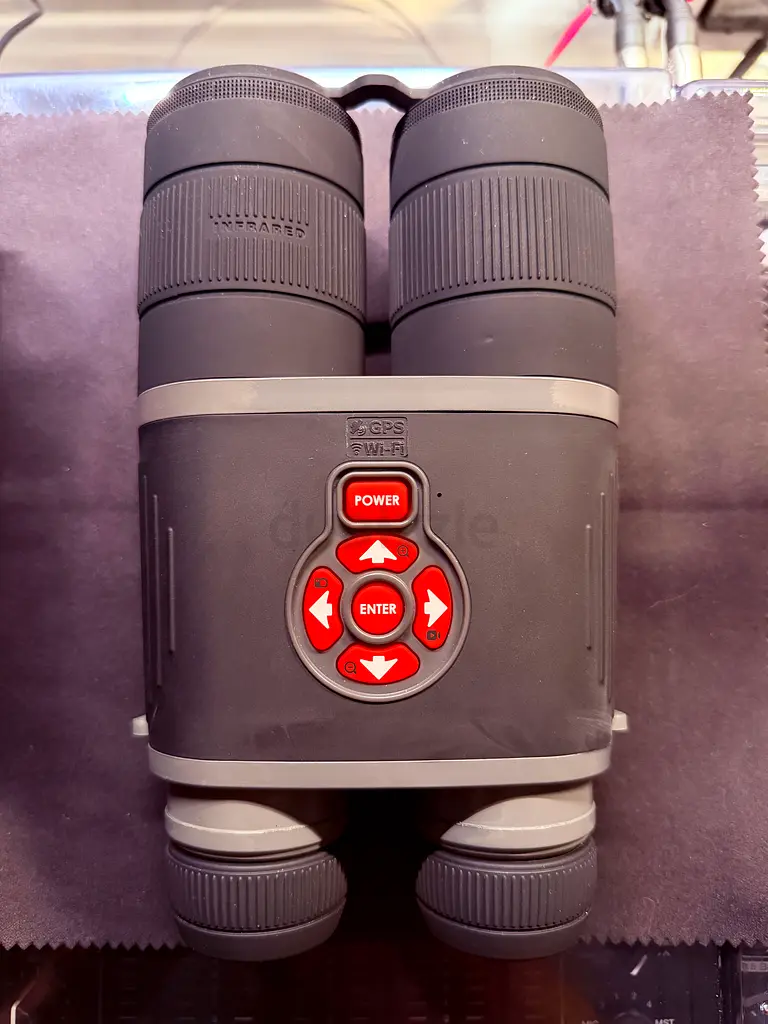
ATN BinoX HD Day Night (Night Vision) Binoculars + 256gb + 4x2550mah direct charge batteries
AED 2,200

Item Details
Brand
Others
Age
1-2 years
Condition
Almost no noticeable problems or flaws
Model
Others
Usage
Used only a few times
Warranty
Does not apply
Posted on: 29th June 2026
Description
The Binoculars are in brilliant working condition as they were used no more than 5 times. There is fading on the Rubber casing due to wear and tear form cleaning the rubber from getting sticky. So not wear and tear from use.
Multi-function device that includes Gen1-style night vision.
One device that also added WiFi and compass functionality.
1. The BinoX is not your typical night vision equipment. Although it has day and night capabilities, The BinoX use a charge-coupled device (CCD) digital sensor instead of an image intensifier tube (Gen1), micro channel plates (Gen2) or high sensitivity and improved frequency response (Gen3). All of these technologies enhance existing light and/or use an IR source to allow the user to see in the dark, but traditional night vision devices typically have better resolution (and a higher cost). The different generations of night vision technologies are complicated, so try not skewer me if I have messed up the explanation.
2. The BinoX are not typical binoculars. Whereas binoculars use a series of lenses to magnify light, the BinoX use a sensor similar to one in a digital camera to zoom between 4 to 16 times the original image size – digitally rather than optically. What this also means is that the view using the BinoX eyepieces looks more like looking into a digital camera viewfinder rather than an edge-to-edge view seen in optical binoculars.
3. The BinoX is advanced consumer-grade technology
Features:
1. 4-16x Digital Zoom
2. 1080P Digital Video/Image capture
3. Day/Night Use
4. WiFi Connection to iOS and Android Mobile Devices
5. Accepts 4GB – 32GB SDCards
6. Rangefinding
7. Compass, Altitude, Velocity Readings
8. Micro HDMI, Micro USB Connections
9. GPS image tagging
10. IR Illuminator
Display
Looking through the BinoX is similar to a heads-up display, with compass direction, tilt, angle of elevation, time and current magnification laid out on the sides of the display. The on-screen readings are both responsive and easy to read.
To get to the menu for settings and configuration, just press the round ‘Enter’ button in the middle of the arrow buttons. Use the arrows to scroll through the options, the last being the configuration screen for making changes to image and video resolution, formatting the microSD card, low light settings and other options. The menu is easy to navigate. Personally i would prefer to have a larger menu that took up more of the screen, but maybe my eyes are just getting old.
The display itself is crisp and clear with no lag between movement of the unit and movement on the screen. It’s not a high definition viewfinder, and some colors might have a slight bloom effect, but the BinoX screen is on par with digital cameras in the same price range.
Use the right objective adjustment to focus the image at different distances. Use the eye piece adjustments to focus the image to your eyesight.
Digital Zoom
At it’s core, the BinoX are digital binoculars. At the base magnification of 4x, the display is sharp, like a high quality digital video camera. To zoom in, just press and hold the top arrow. To zoom out, press and hold the bottom arrow.
As I mentioned above, the BinoX use a sensor to digitally magnify the image rather than an optical magnification using a series of lenses. Distortion is a fact of life with all forms of digital enhancement, and the BinoX zoom magnification is not immune. Once the user increases the magnification past 10x, the on screen distortion is noticeable – the image is both pixelated and blocky. If I had to pick only one criticism for the BinoX, the resolution of magnified images leaves something to be desired. However, I think this is a common issue with any device that uses digital magnification rather than optical magnification (like in Single Lens Reflex (SLR) cameras).
Image and Video Capture
Pressing the left arrow button takes a still image. Pressing the right arrow button starts a video recording. There is a small amount of lag between the time the user presses the button to take either an image or video. The lag can be distracting, but it’s not a deal breaker.
In the configuration menu, the user can change the image settings from a single picture for each press of the left arrow to a burst of pictures with each shot. I found the burst setting helpful, especially when trying to take pictures unsupported and trying to keep an object in frame.
Users can also change the video settings to take 1080P video at 30 frames per second (fps) or 720P at 60fps.
By default, the microphone is disabled for video recording to eliminate capturing noise from the area around the user when focusing on a subject at distance. If you want to record sound with your videos, such as narration or ambient natural sounds, navigate to the configuration menu an enable the microphone.
Night Use
Using the menu, switching between day and night use is done using two clicks. At 4x, between 10 and 100 yards, the low light or night capability is impressive. Using either the green or white setting, the images are clear and detailed. Adjusting the left objective focuses the IR illuminator from narrow to wide, depending on the distance of your subject and your field of view.
Increasing the magnification past 10x at night the clarity of the image becomes challenging. The combination of low light with the digital enhancement creates distortion. Images in the viewfinder lose their clean edges and the distinctions between black and white areas become averaged-out grays. Although it would be easy to blame the BinoX for the poor image quality at these settings, remember, this is a digital image, magnified and enhanced at night. Devices that cost twice the price of the BinoX with less features will suffer similar results.
WiFi Connection to Mobile Apps
I was particularly impressed with the WiFi and Obsidian App functionality of the BinoX. A connection is made between the BinoX and the mobile device by connecting via a direct WiFi network in your iOS (or Andorid) device settings. After entering the WiFi password, the mobile device is directly linked to the BinoX. Open the App and you are presented with three choices: Gallery, Viewfinder and Settings.
* In the Gallery view, the user can browse all the images and videos on the BinoX. Use the ‘Select’ feature to export one or more images from the BinoX to your mobile device. This process saves you the time of removing the microSD card and using a computer to copy your media.
* In the Viewfinder tab, the user’s mobile device can live stream the view from the BinoX onto your mobile device. This allows you to share the view with friends or family, or set up the BinoX on a tripod and monitor the area remotely. While testing this feature, I was able to setup the BinoX in outside overseeing a section of the woods, walk inside the house and upstairs and still had a clear picture. Very cool.
* In the Settings view, the user is able to change your BinoX configurations from your mobile device instead of using the menu in the viewfinder. Changes made on your device happen immediately on the BinoX similar to a remote control.
Range Estimation
The BinoX use a different technique for calculating range estimations from standard rangefinder devices. Using a preset measurement in the settings, or a measurement you input yourself, the BinoX uses an arrow to measure the height of a known object (similar to MOA range estimation). In my case, I input a one-foot measurement in settings. Then I used a 12′ steel target at different known distances to measure from top to bottom. Even though this function isn’t as easy as a standard laser rangefinder, the range estimations were fairly accurate (approx +/- 2%) out to 100 yards.
Multi-function device that includes Gen1-style night vision.
One device that also added WiFi and compass functionality.
1. The BinoX is not your typical night vision equipment. Although it has day and night capabilities, The BinoX use a charge-coupled device (CCD) digital sensor instead of an image intensifier tube (Gen1), micro channel plates (Gen2) or high sensitivity and improved frequency response (Gen3). All of these technologies enhance existing light and/or use an IR source to allow the user to see in the dark, but traditional night vision devices typically have better resolution (and a higher cost). The different generations of night vision technologies are complicated, so try not skewer me if I have messed up the explanation.
2. The BinoX are not typical binoculars. Whereas binoculars use a series of lenses to magnify light, the BinoX use a sensor similar to one in a digital camera to zoom between 4 to 16 times the original image size – digitally rather than optically. What this also means is that the view using the BinoX eyepieces looks more like looking into a digital camera viewfinder rather than an edge-to-edge view seen in optical binoculars.
3. The BinoX is advanced consumer-grade technology
Features:
1. 4-16x Digital Zoom
2. 1080P Digital Video/Image capture
3. Day/Night Use
4. WiFi Connection to iOS and Android Mobile Devices
5. Accepts 4GB – 32GB SDCards
6. Rangefinding
7. Compass, Altitude, Velocity Readings
8. Micro HDMI, Micro USB Connections
9. GPS image tagging
10. IR Illuminator
Display
Looking through the BinoX is similar to a heads-up display, with compass direction, tilt, angle of elevation, time and current magnification laid out on the sides of the display. The on-screen readings are both responsive and easy to read.
To get to the menu for settings and configuration, just press the round ‘Enter’ button in the middle of the arrow buttons. Use the arrows to scroll through the options, the last being the configuration screen for making changes to image and video resolution, formatting the microSD card, low light settings and other options. The menu is easy to navigate. Personally i would prefer to have a larger menu that took up more of the screen, but maybe my eyes are just getting old.
The display itself is crisp and clear with no lag between movement of the unit and movement on the screen. It’s not a high definition viewfinder, and some colors might have a slight bloom effect, but the BinoX screen is on par with digital cameras in the same price range.
Use the right objective adjustment to focus the image at different distances. Use the eye piece adjustments to focus the image to your eyesight.
Digital Zoom
At it’s core, the BinoX are digital binoculars. At the base magnification of 4x, the display is sharp, like a high quality digital video camera. To zoom in, just press and hold the top arrow. To zoom out, press and hold the bottom arrow.
As I mentioned above, the BinoX use a sensor to digitally magnify the image rather than an optical magnification using a series of lenses. Distortion is a fact of life with all forms of digital enhancement, and the BinoX zoom magnification is not immune. Once the user increases the magnification past 10x, the on screen distortion is noticeable – the image is both pixelated and blocky. If I had to pick only one criticism for the BinoX, the resolution of magnified images leaves something to be desired. However, I think this is a common issue with any device that uses digital magnification rather than optical magnification (like in Single Lens Reflex (SLR) cameras).
Image and Video Capture
Pressing the left arrow button takes a still image. Pressing the right arrow button starts a video recording. There is a small amount of lag between the time the user presses the button to take either an image or video. The lag can be distracting, but it’s not a deal breaker.
In the configuration menu, the user can change the image settings from a single picture for each press of the left arrow to a burst of pictures with each shot. I found the burst setting helpful, especially when trying to take pictures unsupported and trying to keep an object in frame.
Users can also change the video settings to take 1080P video at 30 frames per second (fps) or 720P at 60fps.
By default, the microphone is disabled for video recording to eliminate capturing noise from the area around the user when focusing on a subject at distance. If you want to record sound with your videos, such as narration or ambient natural sounds, navigate to the configuration menu an enable the microphone.
Night Use
Using the menu, switching between day and night use is done using two clicks. At 4x, between 10 and 100 yards, the low light or night capability is impressive. Using either the green or white setting, the images are clear and detailed. Adjusting the left objective focuses the IR illuminator from narrow to wide, depending on the distance of your subject and your field of view.
Increasing the magnification past 10x at night the clarity of the image becomes challenging. The combination of low light with the digital enhancement creates distortion. Images in the viewfinder lose their clean edges and the distinctions between black and white areas become averaged-out grays. Although it would be easy to blame the BinoX for the poor image quality at these settings, remember, this is a digital image, magnified and enhanced at night. Devices that cost twice the price of the BinoX with less features will suffer similar results.
WiFi Connection to Mobile Apps
I was particularly impressed with the WiFi and Obsidian App functionality of the BinoX. A connection is made between the BinoX and the mobile device by connecting via a direct WiFi network in your iOS (or Andorid) device settings. After entering the WiFi password, the mobile device is directly linked to the BinoX. Open the App and you are presented with three choices: Gallery, Viewfinder and Settings.
* In the Gallery view, the user can browse all the images and videos on the BinoX. Use the ‘Select’ feature to export one or more images from the BinoX to your mobile device. This process saves you the time of removing the microSD card and using a computer to copy your media.
* In the Viewfinder tab, the user’s mobile device can live stream the view from the BinoX onto your mobile device. This allows you to share the view with friends or family, or set up the BinoX on a tripod and monitor the area remotely. While testing this feature, I was able to setup the BinoX in outside overseeing a section of the woods, walk inside the house and upstairs and still had a clear picture. Very cool.
* In the Settings view, the user is able to change your BinoX configurations from your mobile device instead of using the menu in the viewfinder. Changes made on your device happen immediately on the BinoX similar to a remote control.
Range Estimation
The BinoX use a different technique for calculating range estimations from standard rangefinder devices. Using a preset measurement in the settings, or a measurement you input yourself, the BinoX uses an arrow to measure the height of a known object (similar to MOA range estimation). In my case, I input a one-foot measurement in settings. Then I used a 12′ steel target at different known distances to measure from top to bottom. Even though this function isn’t as easy as a standard laser rangefinder, the range estimations were fairly accurate (approx +/- 2%) out to 100 yards.
Location
Palm Jumeirah, Dubai, UAE

- Accounting / Finance
- Automobile
- Beauty / Salon
- Cleaner / Housekeeper
- Construction
- Cook / Chef
- Customer Service / Call Centre
- Data Management & Analysis
- Design
- Driver / Delivery
- Education
- Engineering
- Event Management & Operations
- Handyman / Technician
- HR / Admin
- Information Technology
- Legal Services
- Logistics & Distribution
- Manufacturing / Warehouse
- Marine Captain / Crew
- Marketing / Advertising
- Media, Art & Entertainment
- Medical / Healthcare
- Real Estate
- Restaurant Operations
- Sales / Business Development
- Secretarial / Front Office
- Security / Guard
- Sports & Fitness
- Travel & Hospitality
- Others
- Jobs Wanted
- Electronics
- Computers & Networking
- Business & Industrial
- Home Appliances
- Sports Equipment
- Clothing & Accessories
- Cameras & Imaging
- Jewelry & Watches
- Pets
- Musical Instruments
- Gaming
- Baby Items
- Toys
- Tickets & Vouchers
- Collectibles
- Books
- Music
- Free Stuff
- Lost/Found
- DVDs & Movies
- Furniture, Home & Garden
- Mobile Phones & Tablets
العربية